Why Apple Screen Time doesn't limit Steam games on Mac
Published June 1, 2026
I walked into the living room one afternoon and found my son deep in a game on his MacBook. Controller in hand, completely in the zone — clearly not noticing me standing there.
The thing is, I had set Screen Time limits. I'd done everything right. Set a daily limit, created a passcode, even double-checked it against Apple's instructions.
"I didn't give you any time for this," I said. "How are you playing?"
He barely looked up. "Steam is different, Dad."
He was right. And once I understood how Steam actually works on Mac, I realized this isn't just a quirk — it's a gap big enough for any gaming kid to walk right through without even trying.
Why Apple Screen Time misses the game
Here's what's happening under the hood.
Steam is a platform. When you install it on a Mac, what you get is the Steam launcher — the app you use to browse your library, buy games, and start playing. That launcher is what shows up in Screen Time's app list.
But when your kid actually plays a game through Steam, Steam launches the game as a separate process. Counter-Strike isn't "Steam." Stardew Valley isn't "Steam." Each game runs under its own name, as its own application.
Apple Screen Time only monitors what it knows to look for. It can set a limit on the Steam launcher — and that limit is respected. But the individual games, the things your kid is actually spending time on, never appear in the Screen Time app list. There's no way to add them. They're invisible to it.
So the limit on "Steam" is technically enforced. Steam the launcher follows the rule. The game keeps running.
This isn't a bug. It's how the system was designed.
Apple Screen Time was built around a straightforward model: one app, one identifier. That works perfectly for most things. Safari is Safari. YouTube is YouTube. Set a limit, and it sticks.
Steam breaks that model. The app you install is just a doorway. The thing your kid actually uses — the game — lives elsewhere on the filesystem and launches as its own process. The launcher and the game are two separate things.
This isn't unique to Steam. Minecraft's launcher works the same way. So do several other gaming platforms popular on Mac. But Steam is by far the most common, and it's usually the first place parents run into this.
How TempoMinder closes the gap
TempoMinder tracks usage differently. Instead of relying on Apple's app list, it monitors activity at the process level — meaning it records every process running on the Mac, regardless of what launched it.
When your kid opens Steam and starts a game, TempoMinder captures:
- Steam (the launcher): active for 3 minutes while browsing the library
- [Game name]: active for 1 hour 47 minutes
Both show up. Both count toward their daily usage. And you can set per-app daily limits on the individual games — the actual things being played — not just the launcher they came through.
There's no workaround. It doesn't matter which launcher starts the game, or where it's installed. The process is captured.
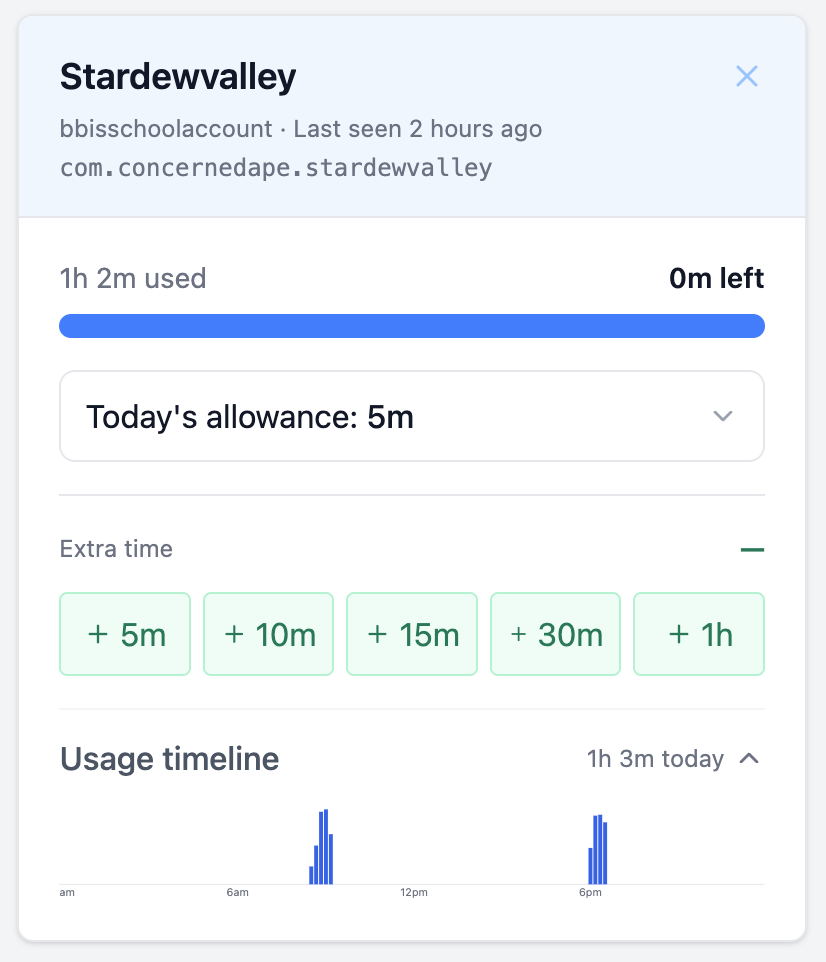
What my dashboard actually showed
After setting up TempoMinder, I went back and looked at that same afternoon.
Steam showed 4 minutes. The game he'd been playing showed 2 hours and 11 minutes.
That's the gap. Not a few minutes of ambiguity — over two hours that Apple Screen Time had zero visibility into.
With TempoMinder, I set a 45-minute daily limit on the game itself. The next day, he got a warning at the 40-minute mark. When the time was up, his Mac enforced the limit locally. No alternate launcher to switch to. No workaround.
He was not thrilled. But that's kind of the point.
Check your own setup right now
If your kid games on Mac through Steam, take a look at two things:
- Open your Screen Time report and look at what's listed under their usage. You'll likely see "Steam" — and nothing for the individual games beneath it.
- Ask yourself: does the time Steam shows actually match how long they were playing?
If there's a gap, Screen Time isn't catching it.
TempoMinder's free plan shows you real process-level usage — including every game launched through Steam or any other platform — at no cost. You don't have to change anything else you're doing today. Install it, watch for one day, and see what's actually happening on your kid's Mac.
Frequently asked questions
Does this affect all Steam games? Yes. Any game launched through Steam on Mac runs as a separate process. Steam itself is just the gateway.
What about Epic Games, Minecraft, or other launchers? Same issue. Any launcher that runs games as separate child processes will have the same blind spot in Apple Screen Time. TempoMinder captures all of them.
Does TempoMinder require iCloud or Apple Family Sharing? No. TempoMinder works completely independently of iCloud. Install it on the Mac once, and manage limits from your parent dashboard on any device.
Is this problem specific to Mac? Yes, for this specific reason. On iOS, apps can't launch arbitrary processes the same way, so Screen Time behaves differently. This gap exists on macOS because of how games are packaged and executed on desktop.
Want to manage Mac screen time without iCloud? Get started free or read the Help & FAQ.